.png?width=160&height=65&name=Prenda_wordmark_dark_high%20res%20(2).png)
The Texas Education Freedom Account Scholarship is a state scholarship that gives families direct access to their child’s education funds. These funds allow parents to customize their child's learning experience, choosing the best resources, curriculum, and educational environment—including Prenda microschools.
Prenda works with the Texas Education Agency and Odyssey, the organizations that manage TEFA funds. This guide will walk you through the application process, funding details, and how to use TEFA funds for your child’s Prenda microschool experience.
IMPORTANT: Applications for the 2026-2027 TEFA Scholarship will close on March 17, 2026. No applications will be accepted after that date.
Applying for EFA funds is a 7 step process:
Step 1: Create an Odyssey account
Step 2: Start application
Step 3: Enter parent or guardian information
Step 4: Add student information
Step 5: Review and submit the application
Step 6: Complete verification process
Step 7: Select school (happens later)
Step 1: Create an Odyssey Account
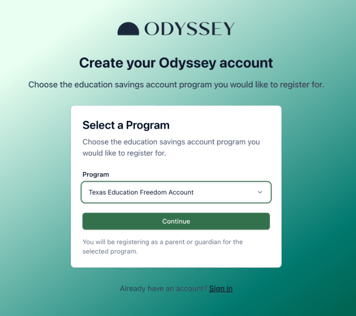
To apply for TEFA, you'll first need to create an Odyssey account.
🔗 Create your Odyssey account here
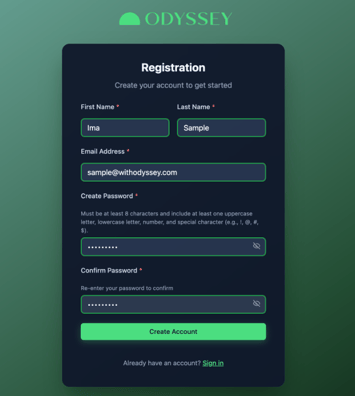
- Select the "Texas Education Freedom Account" program option and follow the prompts to enter your email and add account information.
- The primary guardian should be the account holder.
Step 2: Start application
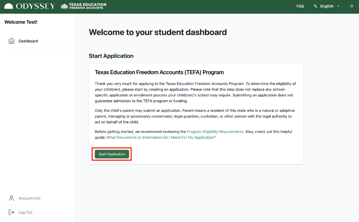
Once your account is created, you'll be taken to your dashboard where you'll want to select "Start Application"
Step 3: Enter parent/guardian information
The first part of the application will require you to enter parent or guardian information. Double check all information input to make your application review process easy.
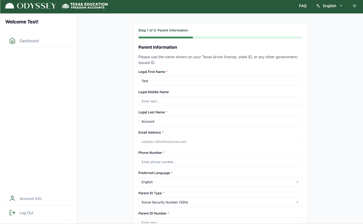
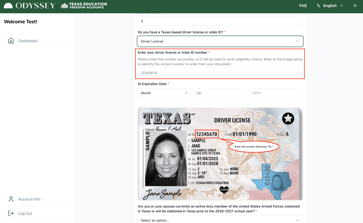
You'll be asked to add driver license or state ID information to your application. Make sure you double check that the driver license or ID number was added correctly and that your expiration date is accurate. This is critical for your application.
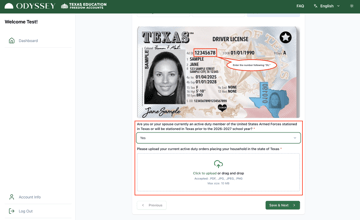
If you are active duty military, you'll also be required to upload your military orders.
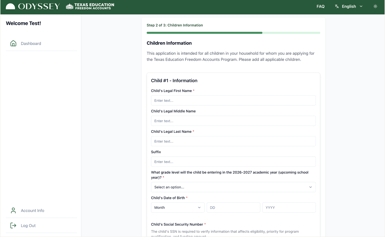
Step 4: Add Student Information
Once all parent/guardian information is entered, you'll move on to enter information about your student(s). Make sure to add information for all children who will be participating in the TEFA program.
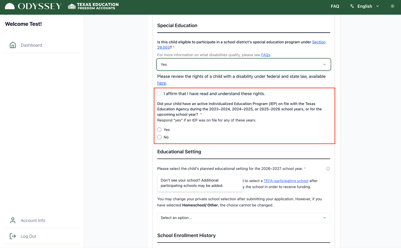
If applicable, provide additional information for children who are entering pre-K or children who receive special education services. Review the following Odyssey article for more information regarding child disability: I Have a Child with a Disability: What Do I Need to Do?
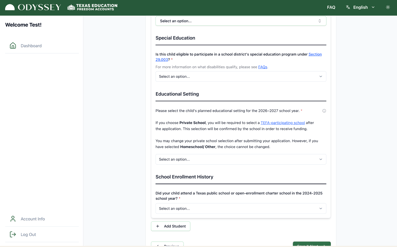
Next, you'll be asked to select your child's education method and provide required school history details.
IMPORTANT! When asked to select the educational setting for your student select "Private School". Otherwise, your student will be considered a homeschool student and be ineligible to receive the full scholarship award amount.
Step 5: Review and submit the application
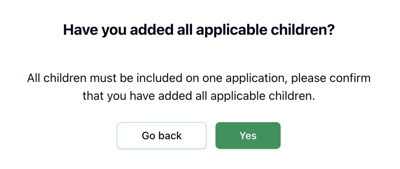
Once all parent/guardian and student information is entered, you'll be asked to review the information submitted and sign attestations. Make sure you've add all children who will be participating in TEFA.
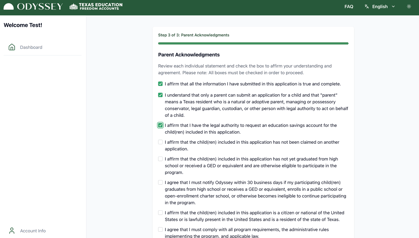
Complete all parent acknowledgements and then submit your application.
Step 6: Complete verification process
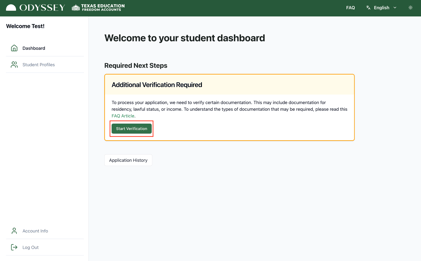
After submitting your application, your dashboard will prompt you to complete the next step which is to verify required documentation. This is a critical part of the process and failure to submit the correct documentation may result in ineligibility. You'll click on "Start Verification" to begin the process.
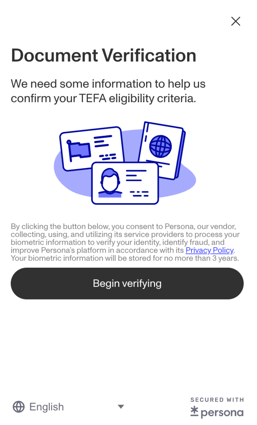
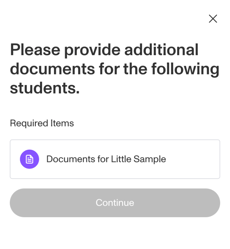
You may be required to add additional documentation for your students if parent verification is unsuccessful.
Once all required documentation has been uploaded you'll see the following screen and be redirected back to your dashboard.
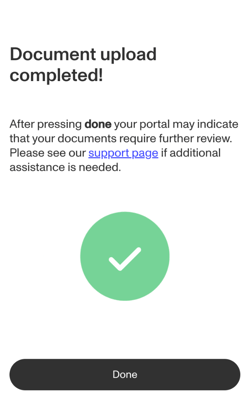 Congratulations, you've completed the required parts of your student's TEFA application! Step 7 is listed below but it does not need to be completed until after your student has been awarded a scholarship.
Step 7: Select School
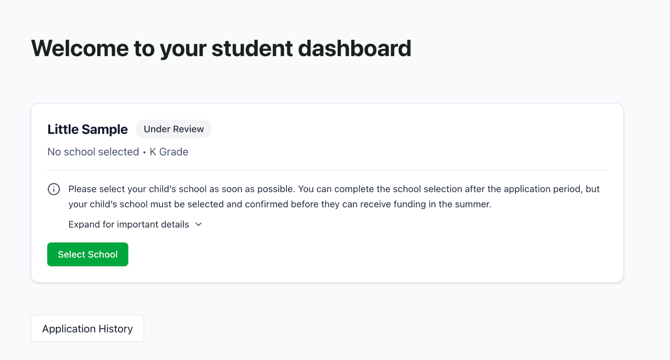
IMPORTANT: Do not select your school until after your student has been awarded a scholarship. This is the official flow:
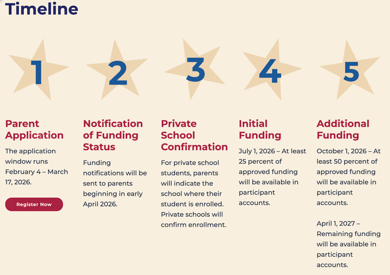
Additionally, Prenda will be adding microschools to the approved TEFA school list in April and May which means that waiting until later makes everything easier!
After submitting your application, and receiving notification of your student's funding status, you'll be asked to select a school of choice.
Remember, you do not want to complete this step until two things have happened:
1️⃣ You have received notice that your student has been approved for the scholarship
2️⃣ Your chosen microschool has been added to the TEFA approved schools list.
After completing your application pay close attention to your email for updates on your scholarship status and funding information.
Funding Timelines, Amounts, and Distribution
TEFA Scholarship funds are distributed on the following schedule:
- July 1, 2026: At least 25% of approved funding will be available in participant accounts
- October 1, 2026: At least 50% of approved funding will be available in participant accounts
- April 1, 2027: All remaining funding will be available in participant accounts
How do I access my funds?
- TEFA funds are managed by Odyssey
- You’ll use Odyssey to pay for educational services, including Prenda.
How much funding will my student receive?
- The average TEFA scholarship amount for 2026-2027 is projected to be ~$10,400
- Students who will be homeschooling may be eligible to receive $2,000. This includes students who are enrolled in a single family Prenda microschool (where the guide is the parent and only guiding their custodial child)
- Students with disabilities may be eligible to receive up to $30,000. They will need to have an IEP on file with the Texas Education Agency by the end of the application period.
- Scholarship amounts depend on grade level and county.
Enrolling a Child in a Prenda Microschool and Using TEFA Funds
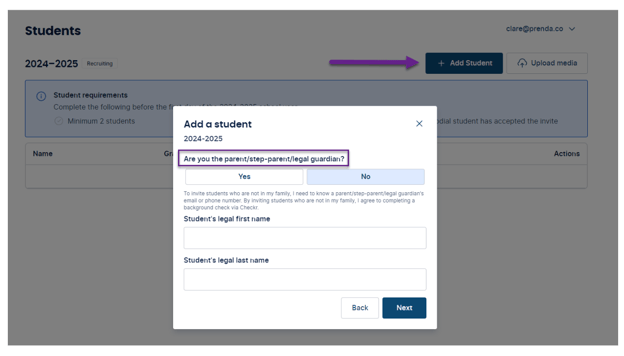
Once your TEFA application is submitted, reach out to your chosen microschool guide and ask them to invite your child to their microschool if you haven’t already.
You must accept an invite in order to be enrolled in their microschool.
Note: If you are a parent using Prenda’s single family microschool option to homeschool, you should add your child now in your Prenda World account.
Helpful Resources
📖 TEFA Information for Families
🛍️ TEFA Parent Application Walkthrough
💵 Texas State Scholarship Overview
Got questions? We’re here to help! Contact Prenda Support for assistance.